
BC Times — README
🌦️ BC Times
Advanced Time & Climate Control for FiveM
Created and maintained by Belials Customs
BC Times is a complete and flexible solution for managing time, weather and server atmosphere in FiveM.
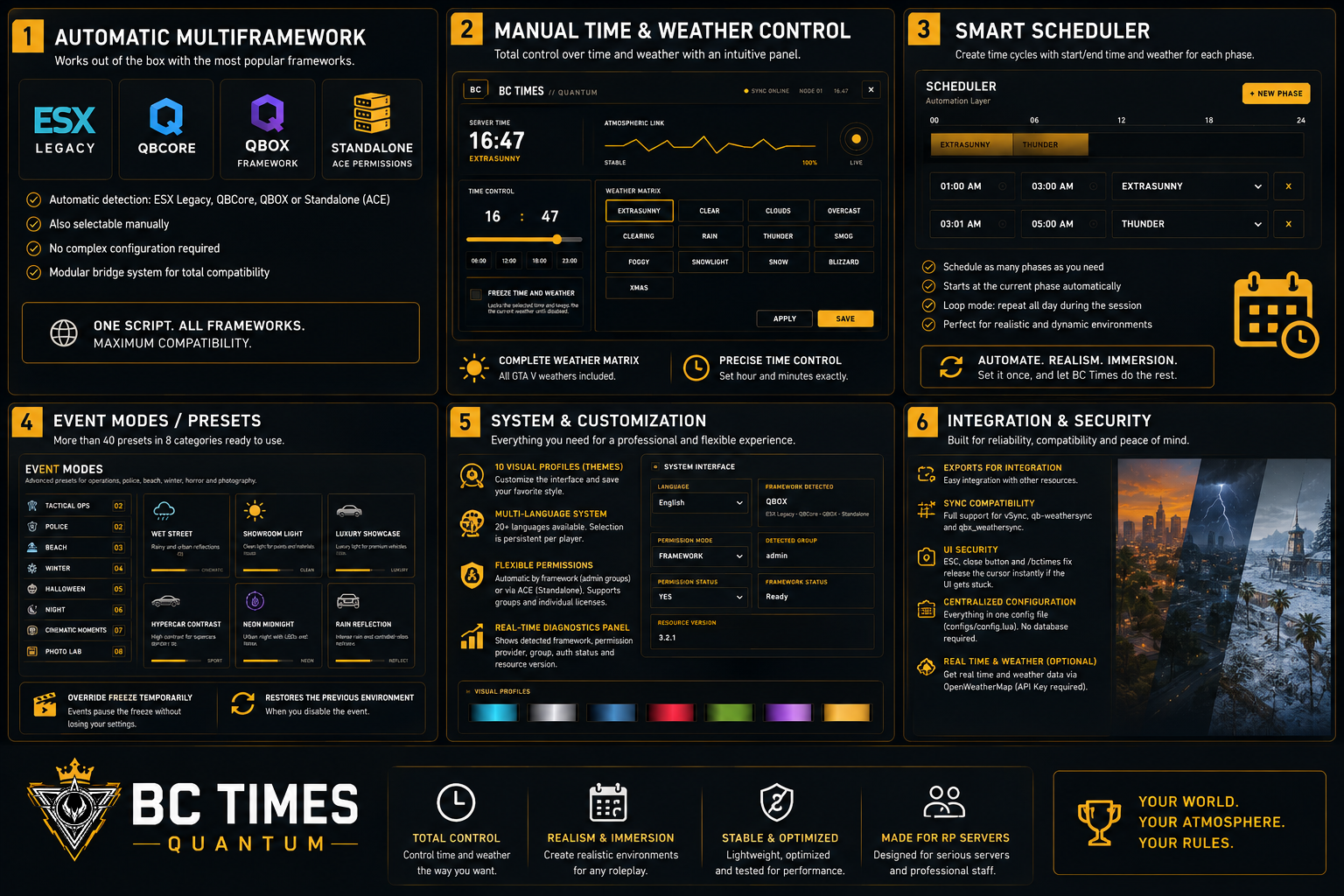
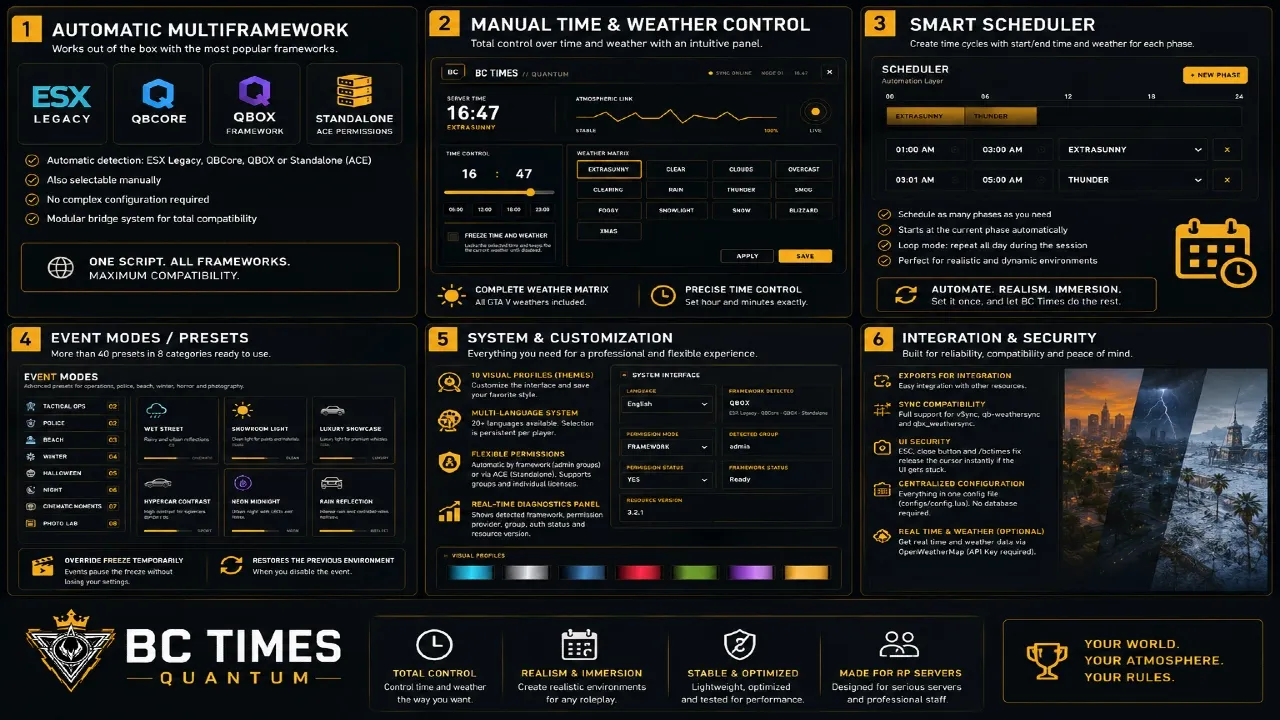
It features automatic framework detection, manual controls, time and weather freezing, scheduled cycles, event presets, multilingual support, visual themes, flexible permissions and integration exports.
No database is required.
🇬🇧 English
📑 Table of Contents
⚡ Compatibility
BC Times supports multiple FiveM frameworks:
QBOX
QBCore
ESX Legacy
Standalone via ACE Permissions
The framework is automatically detected when the resource starts.
Manual framework selection is also available through:
configs/config.lua
🔥 Features
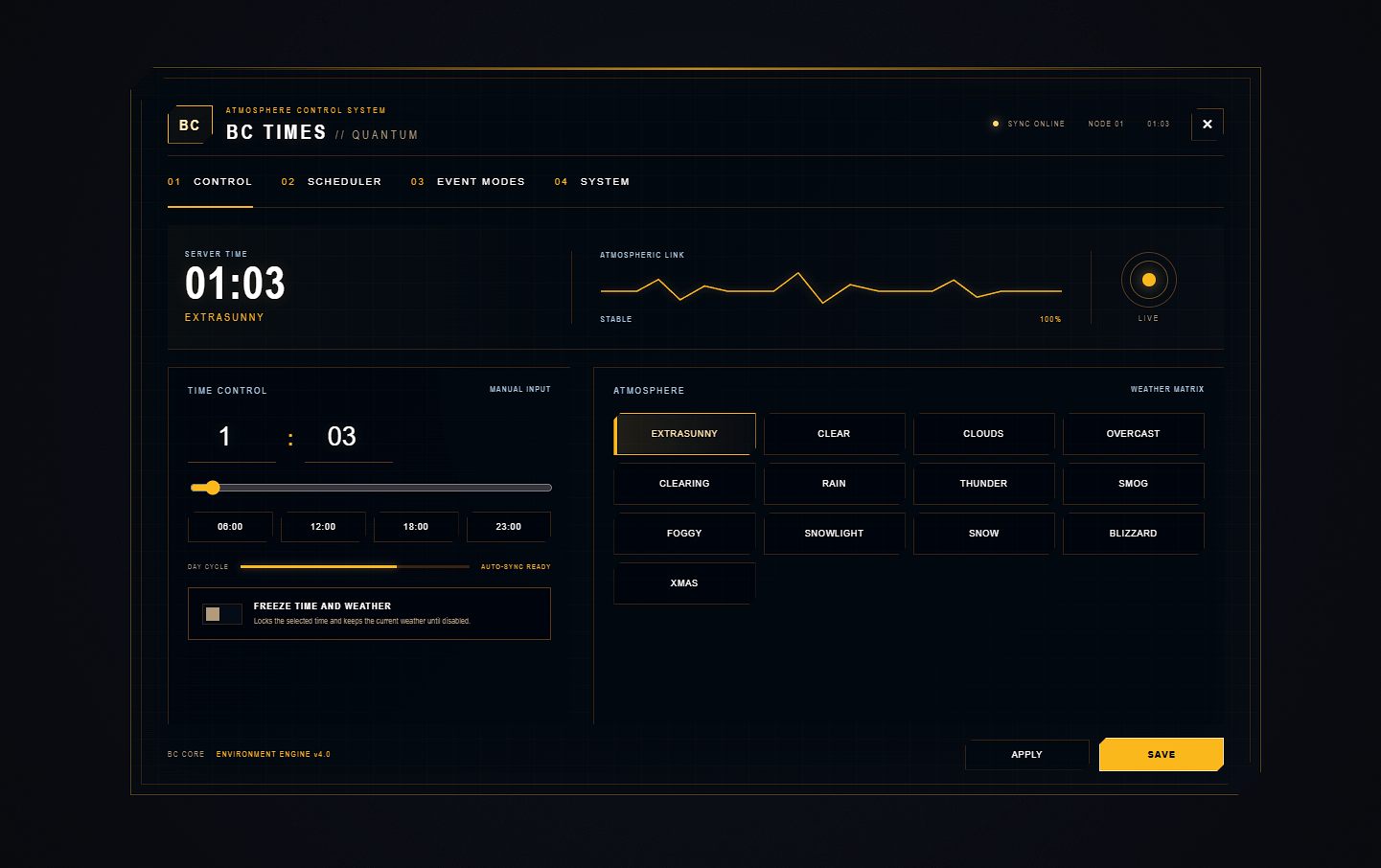
🕒 Manual Time & Weather Control
Take full control of your server environment directly from the administration panel.
Manual hour selection
Manual minute selection
Complete GTA V weather selection
Centralized environment control
❄️ Time & Weather Freeze
Freeze the current environment whenever required.
When Freeze is enabled:
Time progression is paused
Weather remains locked
The selected environment remains active
Freeze can be disabled at any time.
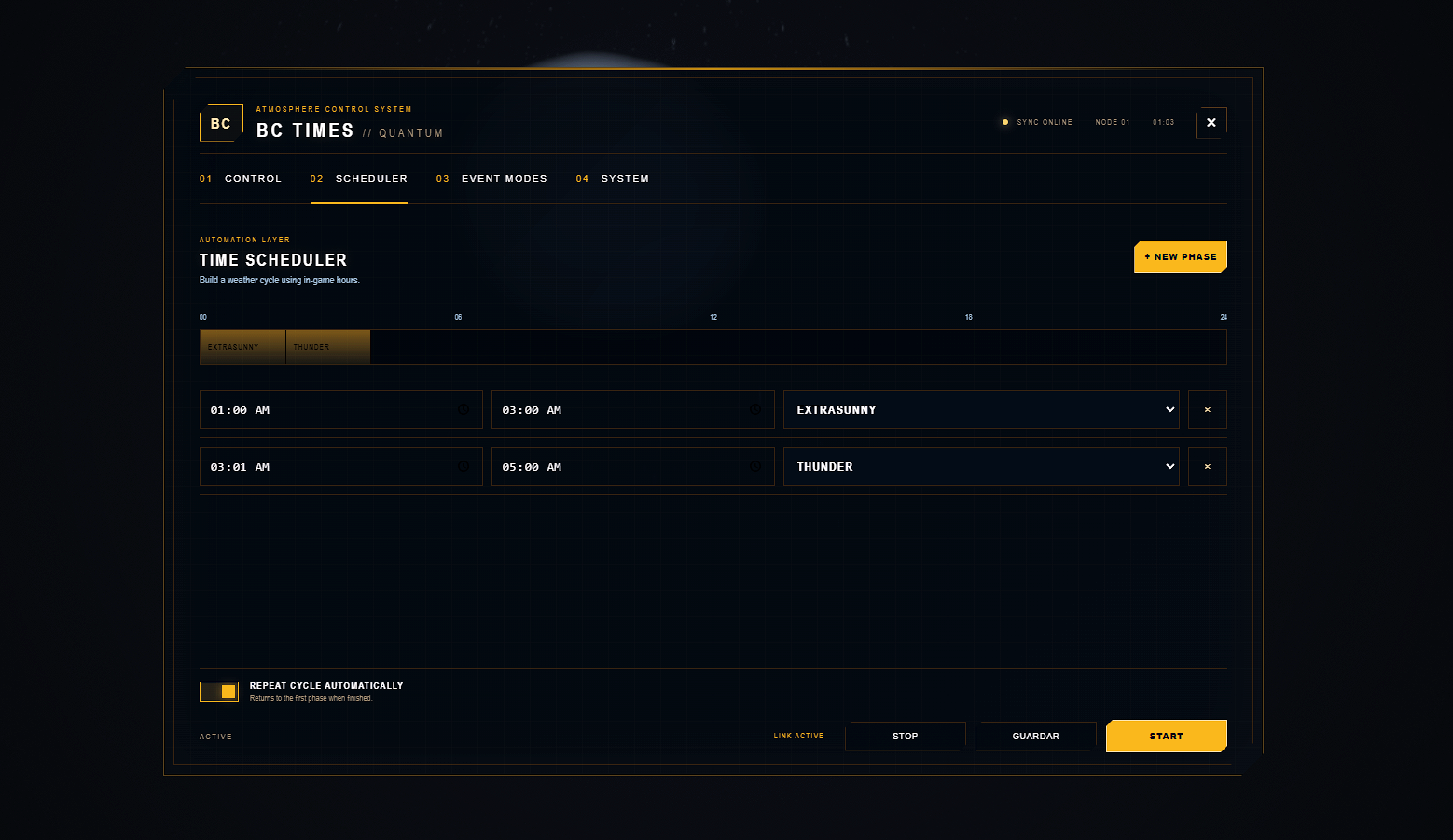
📅 Smart Scheduler
Create automatic time and weather cycles using custom time periods.
Each period can include:
Start time
End time
Weather condition
BC Times automatically detects the current period and continues through the configured schedule.
The entire cycle can also repeat automatically throughout the server session.
🔁 Automatic Daily Cycles
Create complete environmental cycles for your server.
For example:
00:00 → CLEAR
06:00 → EXTRASUNNY
12:00 → CLEAR
18:00 → CLOUDS
22:00 → OVERCAST
BC Times automatically manages the configured progression.
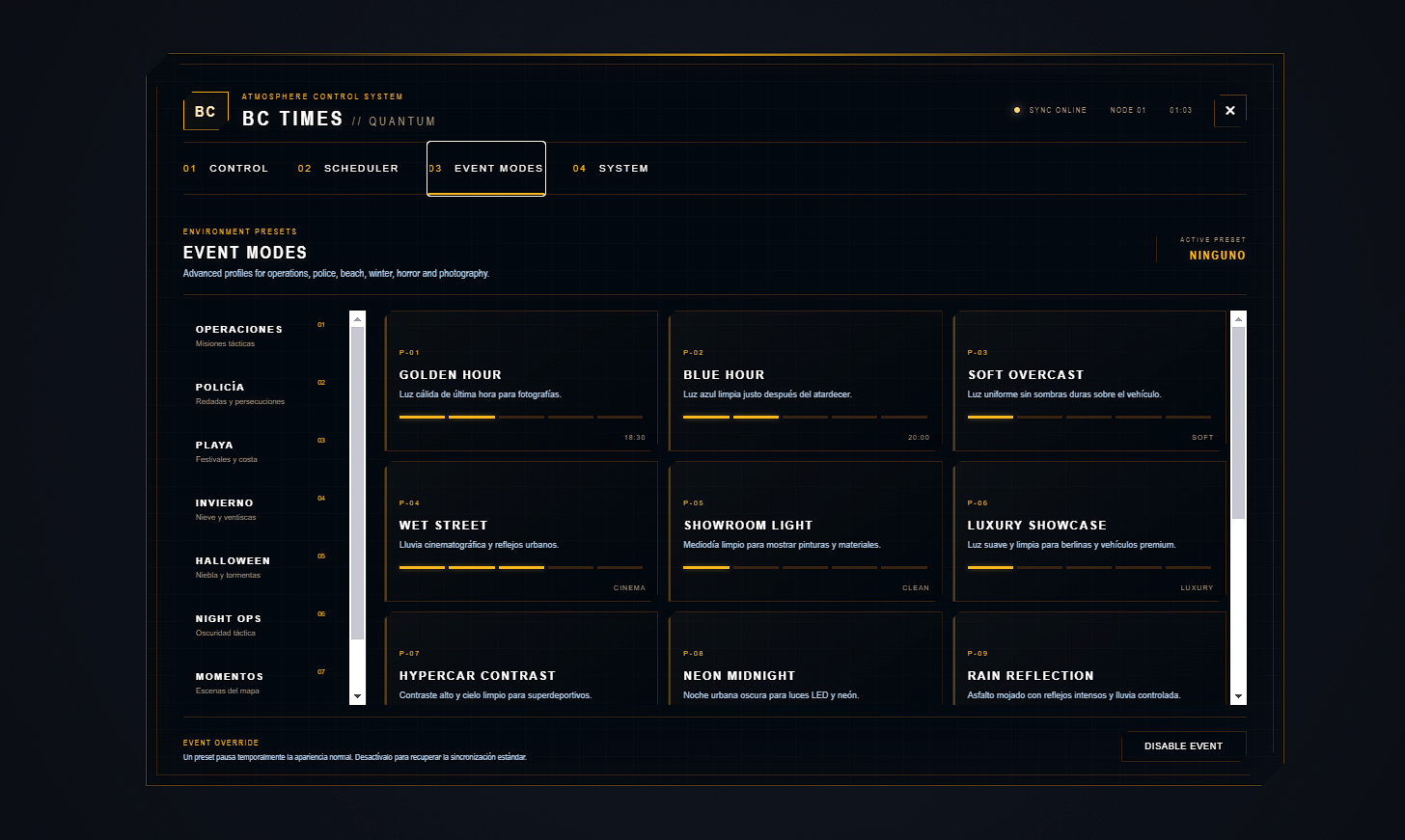
🎬 Event Modes & Presets
BC Times includes more than 40 predefined environments organized into multiple categories.
Available categories include:
Tactical Operations
Police
Beach
Winter
Halloween & Horror
Night
Cinematic Moments
Photo Lab
These presets are ideal for:
Roleplay events
Police operations
Tactical scenarios
Seasonal events
Cinematic scenes
Vehicle photography
Server promotions
🔄 Temporary Freeze Override
Events can temporarily override an active Freeze.
The original environment configuration is preserved.
Freeze Active
      ↓
Event Enabled
      ↓
Temporary Environment Applied
      ↓
Event Disabled
      ↓
Previous Environment Restored
📦 Installation
1. Download BC Times
Download the resource and extract it.
2. Place the resource inside your FiveM resources directory
Example:
resources/
└── BC_Times/
3. Start your framework before BC Times
Example with QBOX:
ensure qbx_core
ensure BC_Times
Example with QBCore:
ensure qb-core
ensure BC_Times
Example with ESX Legacy:
ensure es_extended
ensure BC_Times
4. Configure permissions
Open:
configs/config.lua
Configure framework groups, ACE permissions or custom permissions if required.
5. Start the resource
Add the following to your server.cfg:
ensure BC_Times
🛡️ Permissions
BC Times supports:
Automatic framework permissions
ACE Permissions
Custom permission systems
Groups
Individual player licenses
Default Framework Groups
| Framework | Default Groups |
|---|---|
| ESX Legacy | admin, superadmin |
| QBCore | admin, god |
| QBOX | admin, god |
ACE Permission Example
Authorize a group:
add_ace group.admin bc.times allow
add_principal identifier.license:YOUR_LICENSE group.admin
Replace:
YOUR_LICENSE
with the player's actual FiveM license identifier.
⚙️ Standalone Mode
No framework is required.
If BC Times does not detect QBOX, QBCore or ESX Legacy, it automatically switches to Standalone Mode.
Standalone mode uses ACE Permissions.
Authorize a player directly
add_ace identifier.license:YOUR_LICENSE bc.times allow

ensure BC_Times
Authorize through a group
add_ace group.admin bc.times allow
add_principal identifier.license:YOUR_LICENSE group.admin

ensure BC_Times
Replace YOUR_LICENSE with the player's actual license identifier.
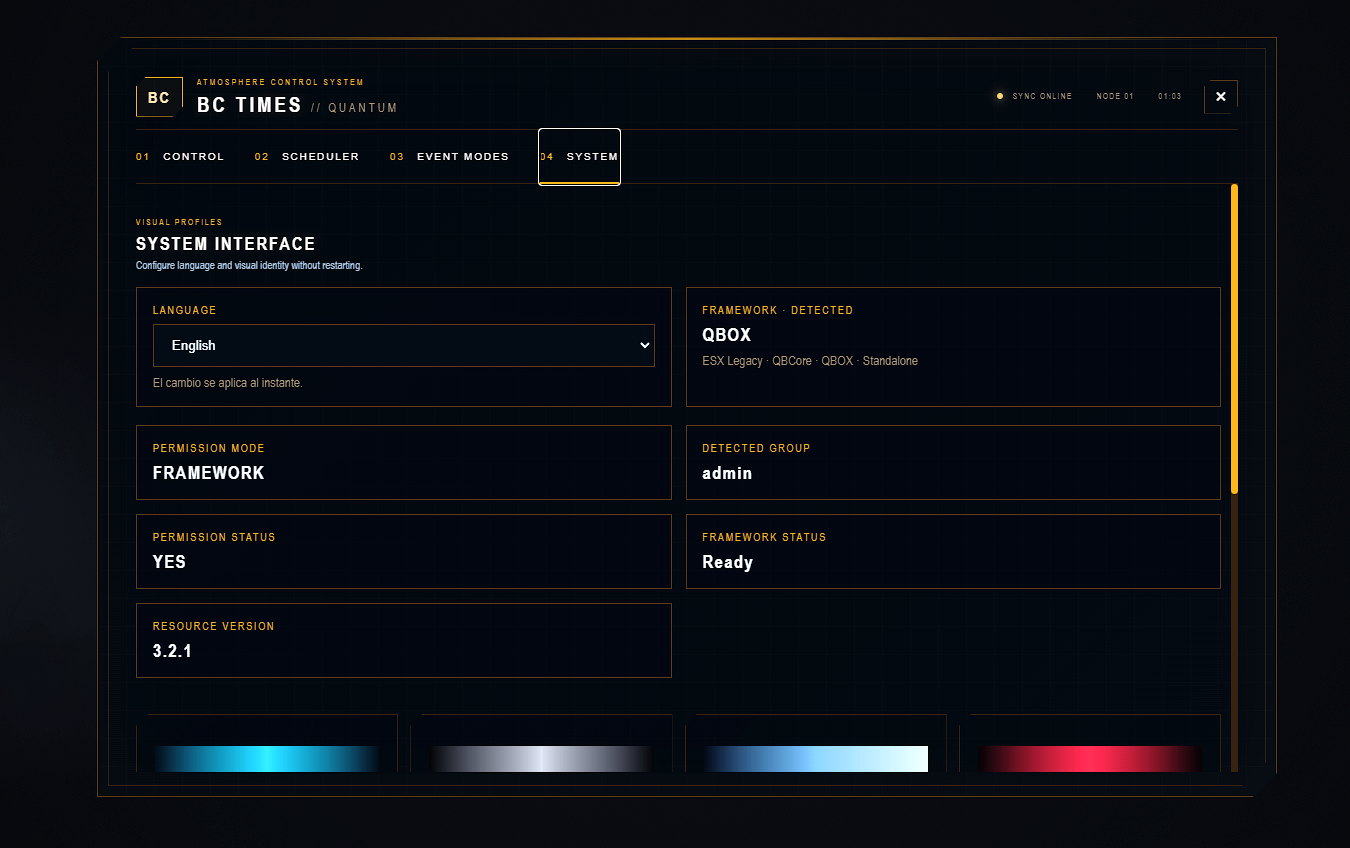
The System panel should display:
Framework: Standalone
Permission Provider: ACE
Authorization: YES
⌨️ Commands
Open the administration panel
/bctimes
Opens the BC Times administration panel.
Fix a stuck cursor
/bctimes fix
Immediately releases the cursor if the UI becomes stuck or closes unexpectedly.
📅 Scheduler
The Scheduler allows you to create custom time and weather periods.
Each period contains:
Start time
End time
Weather
BC Times automatically starts from the appropriate active period and continues through the configured schedule.
The cycle can repeat automatically for the entire server session.
🎬 Event Modes & Presets
BC Times includes more than 40 ready-to-use atmospheric presets.
Categories include:
Tactical Operations
Designed for:
Tactical operations
Special events
High-intensity scenarios
Police
Designed for:
Police operations
Raids
Pursuits
Emergency situations
Beach
Designed for:
Beach events
Summer activities
Coastal environments
Winter
Designed for:
Snow environments
Winter events
Cold conditions
Blizzard scenarios
Halloween & Horror
Designed for:
Halloween events
Horror environments
Storms
Dark scenarios
Night
Designed for:
Night operations
Dark environments
Atmospheric scenes
Cinematic Moments
Designed for:
Roleplay scenes
Cinematics
Special events
Photo Lab
Designed for:
Vehicle photography
Screenshots
Cinematic shots
Promotional content
🌍 Real-World Time & Weather
BC Times optionally supports real-world time and weather using OpenWeatherMap.
To use this feature:
Obtain an OpenWeatherMap API key.
Add the API key to the configuration.
Enable the real-world synchronization option.
An API key is only required when using real-world time or weather.
🎨 Languages & Themes
Multilanguage Support
BC Times supports more than 20 languages.
Available languages include:
Spanish
English
French
German
Italian
Portuguese
Brazilian Portuguese
Russian
Turkish
Polish
Dutch
Czech
Swedish
Danish
Norwegian
Finnish
Japanese
Korean
Chinese
Thai
The selected language is saved per player.
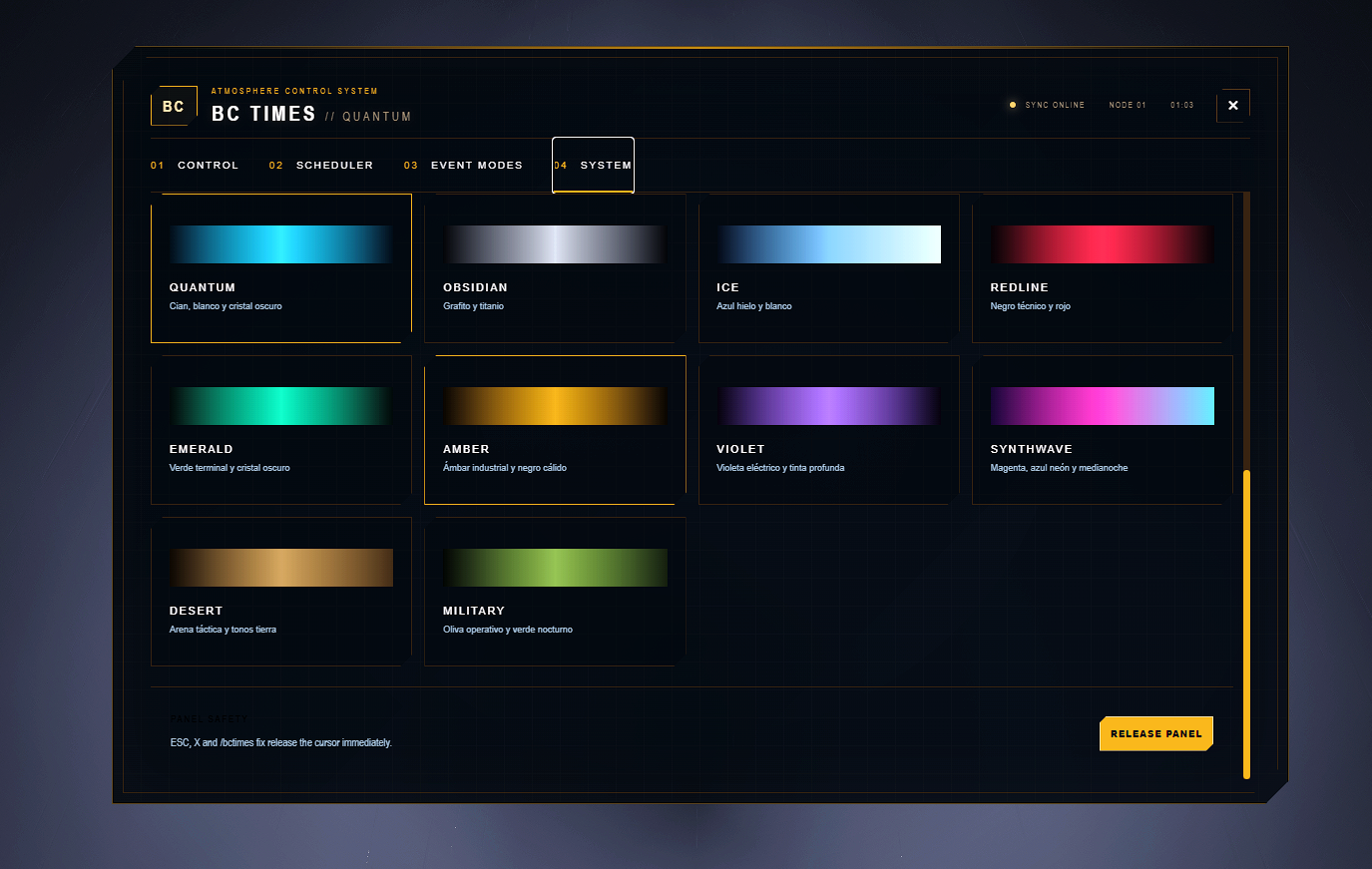
Visual Profiles
BC Times includes 10 visual themes for the user interface.
Each player can select their preferred visual profile.
The selected theme is stored individually.
📊 Diagnostics
The integrated System panel provides real-time diagnostic information.
It displays:
Detected framework
Permission provider
Detected group
Authorization status
Resource status
Installed version
This makes troubleshooting and configuration verification significantly easier.
🔌 Exports & Integration
BC Times includes a modular bridge system and exports for integration with other resources.
Client Exports
GetWeather
GetAllData
GetPauseSyncState
Server Exports
SetTime
SetWeather
HasPermission
GetFramework
GetPermissionProvider
BC Times also provides compatibility support for existing weather synchronization systems, including:
vSyncqb-weathersyncqbx_weathersync
Important: BC Times must be the only active resource controlling time and weather.
⚙️ Configuration
All main configuration is centralized in:
configs/config.lua
Configuration options include:
Automatic framework detection
Manual framework selection
Permission configuration
ACE permissions
Custom groups
Real-world weather
OpenWeatherMap API
Interface settings
No database is required.
⚠️ Requirements & Compatibility
BC Times requires:
An updated FiveM server
A supported framework, if desired
ACE Permissions when using Standalone mode
An OpenWeatherMap API key only when using real-world synchronization
Weather Controller Conflicts
BC Times must be the only active time and weather controller.
Disable other weather synchronization resources such as:
qbx_weathersync
qb-weathersync
vSync
EasyTime
You do not need to remove QBOX, QBCore or ESX.
Only disable the separate resource responsible for time and weather synchronization.
🛠️ Support
Before requesting support:
Check the server console when starting the resource.
Open the System diagnostics panel.
Verify the administrator's framework group.
Verify ACE permissions if using Standalone mode.
Make sure the framework starts before BC Times.
Make sure no other weather controller is active.
🇪🇸 Español
📑 Índice
⚡ Compatibilidad
BC Times es compatible con múltiples frameworks de FiveM:
QBOX
QBCore
ESX Legacy
Standalone mediante ACE Permissions
El framework se detecta automáticamente al iniciar el recurso.
También es posible seleccionarlo manualmente desde:
configs/config.lua
🔥 Funciones
🕒 Control Manual de Hora y Clima
Controla completamente la ambientación de tu servidor desde el panel administrativo.
Selección manual de hora
Selección manual de minutos
Matriz completa de climas de GTA V
Control centralizado del entorno
❄️ Freeze de Hora y Clima
Bloquea la hora y el clima actual cuando sea necesario.
Cuando Freeze está activado:
El tiempo deja de avanzar
El clima queda bloqueado
El entorno seleccionado permanece activo
Puede desactivarse en cualquier momento.
📅 Scheduler Inteligente
Crea ciclos automáticos de hora y clima mediante tramos personalizados.
Cada tramo puede incluir:
Hora de inicio
Hora de finalización
Clima
BC Times detecta automáticamente el tramo activo y continúa con la programación configurada.
El ciclo puede repetirse automáticamente durante toda la sesión del servidor.
🔁 Ciclos Automáticos
Crea ciclos ambientales completos para tu servidor.
Ejemplo:
00:00 → CLEAR
06:00 → EXTRASUNNY
12:00 → CLEAR
18:00 → CLOUDS
22:00 → OVERCAST
BC Times gestionará automáticamente la progresión configurada.
🎬 Modos de Evento y Presets
BC Times incluye más de 40 ambientes predefinidos organizados en diferentes categorías.
Categorías disponibles:
Operaciones tácticas
Policía
Playa
Invierno
Halloween y Horror
Noche
Momentos cinematográficos
Photo Lab
Estos presets son ideales para:
Eventos de rol
Operaciones policiales
Escenarios tácticos
Eventos de temporada
Escenas cinematográficas
Fotografía de vehículos
Promoción del servidor
🔄 Sustitución Temporal de Freeze
Los eventos pueden sustituir temporalmente un Freeze activo.
La configuración original del entorno se conserva.
Freeze Activo
      ↓
Evento Activado
      ↓
Ambiente Temporal Aplicado
      ↓
Evento Desactivado
      ↓
Entorno Anterior Restaurado
📦 Instalación
1. Descarga BC Times
Descarga y extrae el recurso.
2. Coloca el recurso dentro de la carpeta resources
Ejemplo:
resources/
└── BC_Times/
3. Inicia el framework antes que BC Times
Ejemplo con QBOX:
ensure qbx_core
ensure BC_Times
Ejemplo con QBCore:
ensure qb-core
ensure BC_Times
Ejemplo con ESX Legacy:
ensure es_extended
ensure BC_Times
4. Configura los permisos
Abre:
configs/config.lua
Configura los grupos del framework, permisos ACE o permisos personalizados si es necesario.
5. Inicia el recurso
Añade lo siguiente a tu server.cfg:
ensure BC_Times
🛡️ Permisos
BC Times admite:
Permisos automáticos mediante framework
ACE Permissions
Sistemas de permisos personalizados
Grupos
Licencias individuales
Grupos Predeterminados
| Framework | Grupos predeterminados |
|---|---|
| ESX Legacy | admin, superadmin |
| QBCore | admin, god |
| QBOX | admin, god |
Ejemplo ACE
Autorizar un grupo:
add_ace group.admin bc.times allow
add_principal identifier.license:TU_LICENSE group.admin
Sustituye:
TU_LICENSE
por la licencia real de FiveM del jugador.
⚙️ Modo Standalone
No necesitas instalar ningún framework.
Si BC Times no detecta QBOX, QBCore o ESX Legacy, cambiará automáticamente al modo Standalone.
El modo Standalone utiliza ACE Permissions.
Autorizar directamente a un jugador
add_ace identifier.license:TU_LICENSE bc.times allow

ensure BC_Times
Autorizar mediante un grupo
add_ace group.admin bc.times allow
add_principal identifier.license:TU_LICENSE group.admin

ensure BC_Times
Sustituye TU_LICENSE por la licencia real del jugador.
En el panel System debería aparecer:
Framework: Standalone
Permission Provider: ACE
Authorization: YES
⌨️ Comandos
Abrir el panel administrativo
/bctimes
Abre el panel administrativo de BC Times.
Liberar el cursor
/bctimes fix
Libera inmediatamente el cursor si la interfaz queda bloqueada o se cierra de forma inesperada.
📅 Scheduler
El Scheduler permite crear tramos personalizados de hora y clima.
Cada tramo contiene:
Hora de inicio
Hora de finalización
Clima
BC Times comienza automáticamente desde el tramo activo correspondiente y continúa con la programación configurada.
El ciclo puede repetirse automáticamente durante toda la sesión.
🎬 Modos de Evento y Presets
BC Times incluye más de 40 presets ambientales listos para utilizar.
Las categorías incluyen:
Operaciones Tácticas
Diseñado para:
Operaciones tácticas
Eventos especiales
Escenarios de alta intensidad
Policía
Diseñado para:
Operativos policiales
Redadas
Persecuciones
Situaciones de emergencia
Playa
Diseñado para:
Eventos en la playa
Actividades de verano
Ambientes costeros
Invierno
Diseñado para:
Ambientes nevados
Eventos de invierno
Condiciones frías
Ventiscas
Halloween y Horror
Diseñado para:
Eventos de Halloween
Ambientes de terror
Tormentas
Escenarios oscuros
Noche
Diseñado para:
Operaciones nocturnas
Ambientes oscuros
Escenas atmosféricas
Momentos Cinematográficos
Diseñado para:
Escenas de rol
Cinemáticas
Eventos especiales
Photo Lab
Diseñado para:
Fotografía de vehículos
Screenshots
Tomas cinematográficas
Contenido promocional
🌍 Hora y Clima Reales
BC Times permite utilizar opcionalmente información real de hora y clima mediante OpenWeatherMap.
Para utilizar esta función:
Obtén una API Key de OpenWeatherMap.
Añade la API Key a la configuración.
Activa la opción de sincronización real.
La API Key solo es necesaria si deseas utilizar hora o clima reales.
🎨 Idiomas y Temas
Sistema Multidioma
BC Times incluye soporte para más de 20 idiomas.
Entre ellos:
Español
Inglés
Francés
Alemán
Italiano
Portugués
Portugués brasileño
Ruso
Turco
Polaco
Holandés
Checo
Sueco
Danés
Noruego
Finés
Japonés
Coreano
Chino
Tailandés
El idioma seleccionado se guarda individualmente por jugador.
Perfiles Visuales
BC Times incluye 10 temas visuales para la interfaz.
Cada jugador puede seleccionar el perfil visual que prefiera.
El tema seleccionado se guarda individualmente.
📊 Diagnóstico
El panel integrado System proporciona información de diagnóstico en tiempo real.
Muestra:
Framework detectado
Proveedor de permisos
Grupo detectado
Estado de autorización
Estado del recurso
Versión instalada
Esto facilita la comprobación de la configuración y la resolución de problemas.
🔌 Exports e Integración
BC Times incluye un sistema modular Bridge y diferentes exports para facilitar la integración con otros recursos.
Exports de Cliente
GetWeather
GetAllData
GetPauseSyncState
Exports de Servidor
SetTime
SetWeather
HasPermission
GetFramework
GetPermissionProvider
BC Times también ofrece compatibilidad con sistemas existentes como:
vSyncqb-weathersyncqbx_weathersync
Importante: BC Times debe ser el único recurso activo encargado de controlar la hora y el clima.
⚙️ Configuración
Toda la configuración principal está centralizada en:
configs/config.lua
Desde este archivo puedes configurar:
Detección automática de framework
Selección manual de framework
Permisos
ACE Permissions
Grupos personalizados
Clima real
API de OpenWeatherMap
Ajustes de interfaz
No requiere base de datos.
⚠️ Requisitos y Compatibilidad
BC Times requiere:
Un servidor FiveM actualizado
Un framework compatible, si deseas utilizarlo
ACE Permissions para el modo Standalone
Una API Key de OpenWeatherMap únicamente para utilizar sincronización real
Conflictos con otros controladores climáticos
BC Times debe ser el único controlador activo de hora y clima.
Desactiva otros recursos de sincronización como:
qbx_weathersync
qb-weathersync
vSync
EasyTime
No necesitas eliminar QBOX, QBCore o ESX.
Solo debes desactivar el recurso independiente encargado de controlar y sincronizar la hora y el clima.
🛠️ Soporte
Antes de solicitar soporte:
Revisa la consola del servidor al iniciar el recurso.
Abre el panel de diagnóstico System.
Comprueba el grupo del administrador.
Verifica los permisos ACE si utilizas Standalone.
Asegúrate de que el framework se inicia antes que BC Times.
Comprueba que no exista otro controlador de hora o clima activo.
❤️ Credits
BC Times is created and maintained by Belials Customs.
Please distribute BC Times only through official channels and keep all included credits and license files intact.
❤️ Créditos
BC Times ha sido creado y es mantenido por Belials Customs.
Distribuye BC Times únicamente desde los canales oficiales y conserva todos los créditos y archivos de licencia incluidos.
BC TIMES
ADVANCED TIME & CLIMATE CONTROL
Your world. Your atmosphere. Your rules.